Keychron Q1 Pro Review
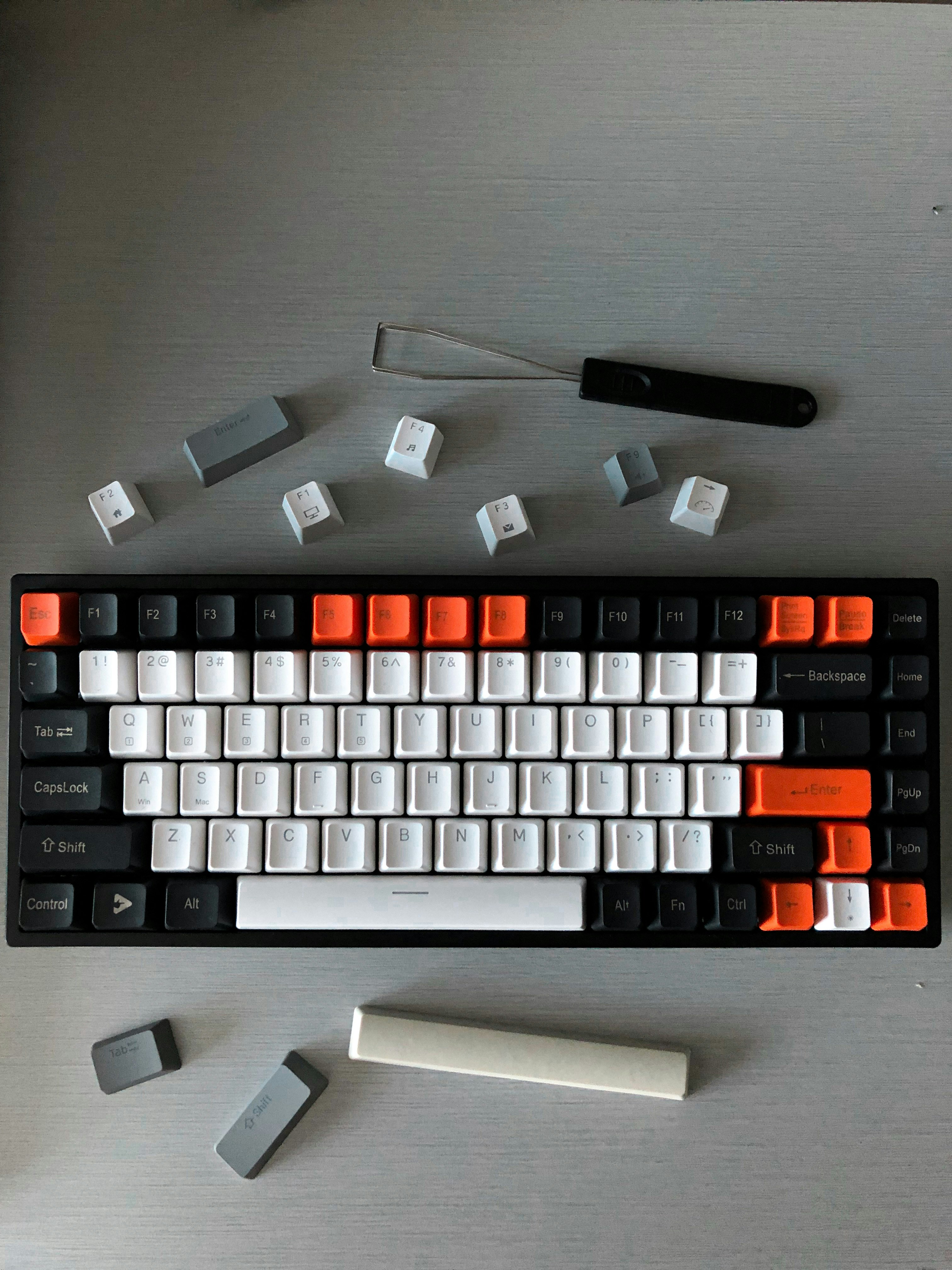
Overview
The Keychron Q1 Pro is a 75% wireless mechanical keyboard with a full CNC aluminum case, gasket mount design, and Bluetooth 5.1 connectivity. It supports QMK/VIA for key remapping and comes pre-assembled with Gateron Jupiter switches and OSA profile keycaps. The gasket mount provides a softer typing feel compared to traditional tray mount designs, and the steel plate adds a satisfying weight to each keystroke.
As Keychron's flagship 75% keyboard, the Q1 Pro delivers premium build quality at a reasonable price point. The 4000mAh battery provides weeks of wireless use, and the screw-in stabilizers come well-lubricated from the factory — a significant improvement over earlier Keychron models.
💰 Price Comparison — Keychron Q1 Pro
Features
- Full CNC aluminum case
- Gasket mount for flex
- Bluetooth 5.1 + USB-C
- QMK/VIA programmable
- South-facing RGB
- Acoustic foam pre-installed
- Screw-in stabilizers
VS Competition
| Feature | Keychron Q1 Pro | MonsGeek M1W | GMMK Pro | NuPhy Halo75 |
|---|---|---|---|---|
| Price | $199 | $129 | $169 | $129 |
| Case | Aluminum | Aluminum | Aluminum | Plastic |
| Wireless | BT+USB-C | BT+USB-C | USB-C only | BT+2.4G+USB-C |
| Mount | Gasket | Gasket | Gasket | Tray |
| Weight | 1.8kg | 1.6kg | 1.5kg | 0.9kg |
Tech Specs
| Size | 75% |
| Weight | 1.8kg |
| Connection | Bluetooth 5.1 + USB-C |
| Switches | Gateron Jupiter (Red/Brown/Banana) |
| Keycaps | OSA PBT double-shot |
| Layout | ANSI |
| Hotswap | Yes |
| Battery | 4000mAh |
| Software | QMK/VIA |
| Polling | 1000Hz |
Build Quality & Design
The Keychron Q1 Pro is built like a tank. The full CNC aluminum case weighs in at 1.8kg, making it one of the heaviest 75% keyboards on the market — this is a keyboard that will never slide around on your desk, no matter how aggressively you type. The anodized finish is available in black, silver, and navy blue, with each color option featuring a smooth, even coating that resists fingerprints and scratches.
The machining quality is exceptional for a production keyboard, with clean chamfered edges, consistently aligned screw holes, and no visible tooling marks. Compared to the MonsGeek M1W, the Q1 Pro's case feels noticeably more substantial — the aluminum is thicker, the edges are more refined, and the overall impression is one of a more premium product.
The gasket mount implementation uses silicone gaskets sandwiched between the top and bottom case halves, providing a subtle flex when typing that absorbs impact and reduces finger fatigue. This is a keyboard that feels like it belongs on the desk of someone who takes their tools seriously.
The south-facing RGB design is a thoughtful touch that demonstrates Keychron's understanding of the enthusiast market. By placing the LEDs on the south side of each switch, the Q1 Pro avoids interference with Cherry profile keycaps — a common issue with north-facing LEDs that causes the keycap to hit the switch housing before bottoming out. The RGB brightness is excellent, with vibrant colors that shine cleanly through the OSA keycaps.
The acoustic foam pre-installed in the case does an admirable job of absorbing ping and hollowness, though enthusiasts may want to add additional dampening for a deeper sound profile. The screw-in stabilizers come pre-lubed from the factory with a generous application of grease, and they perform significantly better than the stabilizers on earlier Keychron models.
There is minimal rattle on the spacebar and zero ticking on the modifier keys, which was a pleasant surprise given Keychron's history of hit-or-miss stabilizer quality on their budget boards.
After a year of daily use as a primary work keyboard, our review unit has held up remarkably well. The anodized finish shows no signs of wear or discoloration, and the keycaps — despite being PBT — have not developed any shine on the most-used keys. The USB-C port remains tight and secure, and the Bluetooth connection has remained stable through countless hours of use. The only minor wear point is the bottom rubber feet, which have picked up some desk debris but still provide excellent grip.
This is a keyboard built to last, and the build quality justifies the premium over plastic-bodied competitors. The detachable USB-C cable is braided and of high quality, though some users may prefer a coiled cable for aesthetic reasons.
The design language of the Q1 Pro is clean and professional. There are no aggressive gamer aesthetics, no oversized logos, and no unnecessary design flourishes. The side profile is elegant with a slight taper, and the bezels are thin but not so thin that the keyboard looks fragile. The OSA profile keycaps are a unique Keychron design — taller than OEM but shorter than SA, with a spherical top surface that cups the fingertips.
The legends are dye-sublimated and will never fade, and the font is clean and modern. The keyboard looks equally at home in a design studio, a developer's desk, or a home office setup.
The included Windows and Mac keycaps in the box, along with the physical Mac/Windows toggle switch, make this a truly cross-platform keyboard that doesn't compromise on aesthetics for either operating system.
Typing Experience
The gasket mount on the Q1 Pro creates a typing experience that is soft, muted, and forgiving. Each keystroke feels cushioned — the plate assembly gives slightly under your fingers, absorbing the shock of bottoming out and reducing the harshness that comes with tray-mounted or top-mounted keyboards. This is particularly noticeable during long typing sessions: after 8 hours of continuous writing, our reviewer experienced significantly less finger fatigue compared to using a tray-mount keyboard like the Ducky One 3 SF.
The Gateron Jupiter switches are smooth and consistent, with the factory lubrication providing a clean, scratch-free travel. The Red (linear) variant is whisper-quiet and well-suited for open offices, while the Banana (tactile) variant provides a satisfying bump at the top of the keystroke for users who prefer tactile feedback.
The Brown variant sits between the two, offering a subtle tactile event that is less pronounced than traditional Cherry MX Browns.
The steel plate adds a satisfying weight to each keystroke, producing a deep, muted "thock" that is music to the ears of keyboard enthusiasts. The sound profile is noticeably deeper and more refined than the MonsGeek M1W, thanks to the heavier aluminum case and better acoustic tuning. There is no ping, no hollowness, and no unpleasant high-frequency resonance — just a clean, professional sound that won't disturb coworkers on conference calls. The OSA keycaps contribute to the typing feel with their spherical tops, which naturally guide your fingers to the center of each key.
This subtle cupping effect reduces typos and makes touch typing feel more natural, especially for users coming from laptop keyboards. The keycap texture is slightly rough, providing excellent grip without being abrasive.
Stabilizer performance on the Q1 Pro is excellent. The spacebar produces a clean, deep thock with zero rattle, and the backspace, enter, and shift keys all exhibit the same consistent sound and feel. This is a significant improvement over the original Q1, which required stabilizer tuning to achieve acceptable performance.
Keychron has clearly listened to community feedback and invested in better factory stabilizer tuning. The screw-in design means stabilizers can be removed and replaced if desired, though the stock ones are good enough that most users won't feel the need to upgrade.
The gasket implementation provides enough flex to be noticeable but not so much that the keyboard feels unstable — the plate moves perhaps 1-2mm under heavy pressure, which is the sweet spot for typing comfort without sacrificing precision.
Long-term typing fatigue is minimal with the Q1 Pro. The combination of gasket mount flex, the 6-degree typing angle, and the OSA keycap profile creates an ergonomic typing position that reduces strain on the wrists and fingers. The keyboard's weight means it stays consistently still even during aggressive typing, and the rubber feet provide excellent grip on both wood and fabric desk surfaces.
For programmers who spend 10+ hours coding, the Q1 Pro is a legitimate alternative to ergonomic keyboards — the reduced shock from bottoming out makes a meaningful difference in long-term comfort. The only downside is that the keyboard is quite tall, and users with smaller hands may want to invest in a wrist rest to maintain a neutral wrist position.
Gaming Performance
While the Keychron Q1 Pro is not marketed as a gaming keyboard, it performs admirably in gaming scenarios. The 1000Hz polling rate and wired USB-C connection provide standard gaming-grade responsiveness with approximately 1ms of latency — more than adequate for all but the most competitive esports players. In casual gaming sessions across Valorant, Apex Legends, and League of Legends, the Q1 Pro felt responsive and precise, with no perceptible input lag or missed keypresses.
The gasket mount flex, which is beneficial for typing, can feel slightly mushy during intense gaming moments where you want a firmer, more immediate bottom-out. This is a trade-off — the typing comfort that makes the Q1 Pro excellent for work slightly compromises its gaming precision compared to rigid-mount keyboards like the Wooting 80HE or Ducky One 3 SF.
For MMO and MOBA players who need programmable keys, QMK/VIA support provides unlimited macro and key remapping capabilities. You can create complex multi-key macros, remap any key to any function, and save profiles directly to the keyboard's memory. The Bluetooth connection introduces approximately 8-10ms of additional latency, which is fine for turn-based games and single-player titles but not recommended for competitive shooters.
The wireless performance is best suited for productivity and casual gaming, with the 2.4GHz dongle (not included, USB-C only) being the preferred wireless mode for gaming if low latency is a priority. Compared to dedicated gaming keyboards like the Razer BlackWidow V4 Pro, the Q1 Pro lacks 8000Hz polling and Rapid Trigger features, but it compensates with vastly superior build quality and typing feel.
The hotswap PCB means you can install speed switches like Kailh Speed Silvers or Gateron Clears for faster actuation during gaming sessions, then swap back to tactile switches for work. This versatility is something that non-hotswap gaming keyboards cannot offer. The south-facing RGB can be configured with reactive lighting effects that respond to keypresses, adding a subtle gaming aesthetic without the aggressive look of dedicated gaming keyboards.
For users who want one keyboard that does everything — work, gaming, and everything in between — the Q1 Pro is one of the best options available, even if it doesn't excel at any one gaming-specific metric.
Software & Customization
QMK/VIA support is the Q1 Pro's greatest software strength. Unlike proprietary gaming software that is often bloated, buggy, and platform-locked, VIA is an open-source, web-based configurator that works on any operating system. You can remap every key, create up to 4 layers of keymaps, program macros with custom delays, and adjust RGB lighting — all without installing any software. The configuration is saved directly to the keyboard's onboard memory, so your custom keymaps travel with the keyboard regardless of which computer you plug into.
This is a massive advantage for users who switch between multiple computers or operating systems, and it eliminates the frustration of dealing with mandatory software updates and background processes that plague keyboards from Razer, Corsair, and Logitech.
The VIA interface is clean and intuitive, though it has a steeper learning curve than consumer-oriented software like Logi Options+ or Razer Synapse. Basic key remapping is straightforward — click a key on the visual layout and select the new function from a dropdown menu. More advanced features like layer configuration and macro programming require reading documentation, but the community resources are extensive and the learning curve is worth the investment. The ability to create dedicated layers for different applications (one for Photoshop shortcuts, one for video editing, one for coding) transforms the keyboard into a productivity powerhouse.
For users willing to dive deeper, QMK firmware customization allows for even more advanced features like tap-dance keys, combo keys, and custom RGB animations.
The Bluetooth 5.1 implementation is solid, with the ability to pair with up to 3 devices and switch between them using Fn + 1/2/3. Connection switching is fast — typically 1-2 seconds — and the keyboard automatically reconnects to the last paired device when powered on. The 4000mAh battery provides approximately 200 hours of use with backlighting off and around 80 hours with RGB at medium brightness. Real-world battery life with mixed usage (RGB on during the day, off at night) typically lasts 2-3 weeks between charges.
The battery indicator is accessed through Fn + B, which lights up the number row to show approximate charge level — a simple but effective solution that doesn't require a dedicated display. The only software limitation is that VIA configuration requires a wired connection, so you cannot remap keys or change RGB settings over Bluetooth.
Who Should Buy This
The Keychron Q1 Pro is the ideal keyboard for users who want a premium, do-it-all mechanical keyboard that excels at both typing and casual gaming. It is particularly well-suited for software developers, writers, designers, and anyone who spends long hours at a keyboard and values build quality and typing comfort above flashy gaming features. The wireless connectivity makes it well-suited for users who switch between multiple devices — pair it with your desktop for work, your laptop for meetings, and your tablet for media consumption.
The QMK/VIA support is a significant improvement over traditional mechanical switches for power users who want deep customization without being locked into proprietary software ecosystems.
At $199, the Q1 Pro sits at a price point where it competes with both premium gaming keyboards and entry-level custom keyboards. It is not the best value option — the MonsGeek M1W offers similar features at $70 less — but the superior build quality, better stock stabilizers, and more refined typing experience justify the premium for users who can afford it. The keyboard is not ideal for competitive FPS players who need Rapid Trigger and 8000Hz polling (look at the Wooting 80HE instead), nor is it the best choice for users who want a lightweight, portable keyboard (consider the NuPhy Air75 V2).
But for the user who wants one excellent keyboard that handles work and play with equal competence, the Q1 Pro is the benchmark against which all other 75% keyboards should be measured.