NuPhy Air75 V2 Review
Overview
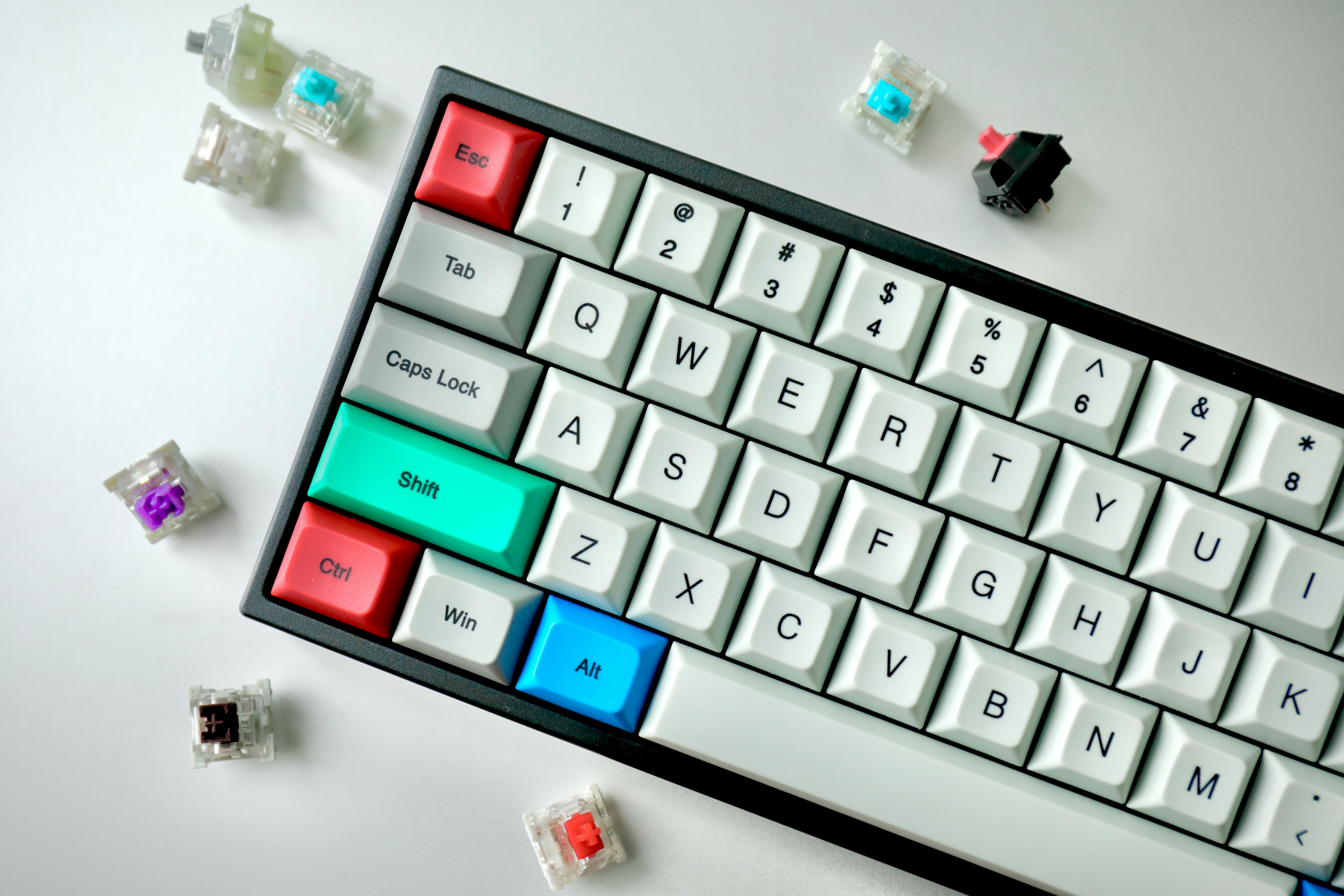
The NuPhy Air75 V2 is a 75% low-profile mechanical keyboard that proves thin keyboards can still deliver a premium typing experience. At just 16.5mm thick and 460g, it slips easily into a laptop sleeve — making it the ultimate portable mechanical keyboard. It features Gateron low-profile 2.0 switches, full QMK/VIA programmability, and triple-mode wireless connectivity (2.4GHz, Bluetooth, and USB-C).
The V2 generation improves on the original with better stabilizers, an enhanced 4000mAh battery for longer wireless use, and an NSL anti-glare coating on the aluminum top plate. The PBT keycaps have a subtle scoop that guides fingers naturally, and the RGB backlighting shines cleanly through the legends.
💰 Price Comparison — Nuphy Air75 V2
Features
- 16.5mm ultra-thin design
- QMK/VIA programmable
- Triple-mode wireless (2.4GHz + Bluetooth + USB-C)
- Gateron LP 2.0 switches
- PBT keycaps
- NSL anti-glare coating
Tech Specs
| Size | 75% |
| Connection | 2.4GHz + Bluetooth + USB-C |
| Switches | Gateron LP 2.0 |
| Battery | 4000mAh |
| Weight | 460g |
| Thickness | 16.5mm |
| Keycaps | PBT double-shot |
| Hotswap | Yes |
| Layout | ANSI |
| Software | QMK/VIA |
Build Quality & Design
The NuPhy Air75 V2 is a masterclass in portable keyboard design. At just 16.5mm thick and 460g, it is thinner and lighter than most tablets, yet it manages to pack a full 75% layout with all the keys you need for productive work. The aluminum top plate provides structural rigidity without adding significant weight, and the NSL anti-glare coating gives the surface a premium, fingerprint-resistant finish that looks clean even after hours of use. The bottom case is made of high-quality ABS plastic that feels dense and solid — there is no creaking or flexing when you pick up the keyboard, which is impressive for a device this thin. Compared to the Logitech MX Mechanical Mini, the Air75 V2 feels more substantial and premium, with better materials and more attention to detail in the construction.
The magnetic feet allow for two typing angles (3.5° and 6.5°), and they snap into place with a satisfying click that inspires confidence in their durability.
The design language of the Air75 V2 is modern and minimal, with a distinctive color scheme that sets it apart from the sea of black and silver keyboards. The two-tone keycap design uses a light base color with darker modifier keys, creating a visual hierarchy that is both functional and aesthetically pleasing. The RGB lighting shines cleanly through the PBT keycap legends, and the south-facing LED orientation ensures compatibility with aftermarket keycaps.
The attention to detail extends to the included accessories — the keyboard ships with a dust cover, a coiled USB-C cable, extra keycaps for Mac users, and a carrying case that is actually well-made rather than an afterthought. The 2.4GHz dongle stores magnetically in a dedicated slot on the bottom of the keyboard, so you never have to worry about losing it.
After six months of daily use as a travel keyboard — tossed into backpacks, used in coffee shops, and transported between home and office — our review unit shows minimal signs of wear. The PBT keycaps have not developed any shine, the aluminum top plate is free of scratches, and all switches still feel as smooth as they did on day one. The only minor issue is that the rubber feet have accumulated some dirt from various desk surfaces, but they still grip effectively.
The USB-C port remains tight and secure, and the magnetic dongle storage has not loosened over time. This level of durability is impressive for a keyboard this thin and light, and it speaks to the quality of materials and construction that NuPhy has invested in.
The compact 75% layout is an excellent quite executed on the Air75 V2. Despite the small footprint, you get dedicated arrow keys, a function row, and a navigation cluster — all the keys that make a keyboard practical for real work. The key spacing is standard, so there is no learning curve or adjustment period when switching from a full-size keyboard. The low-profile design means you don't need a wrist rest — the keyboard sits flat enough on the desk that your wrists remain in a neutral position. This is a significant ergonomic advantage over standard-height mechanical keyboards, which often require a wrist rest for comfortable extended use.
For users who value desk aesthetics, the Air75 V2's compact size and clean design make it a centerpiece rather than an eyesore.
Typing Experience
The Gateron low-profile 2.0 switches deliver a typing experience that bridges the gap between laptop keyboards and full-height mechanical switches. With approximately 3.0mm of total travel (compared to 4.0mm for standard MX switches), the key travel is shorter but still provides satisfying mechanical feedback. The tactile variant (Brown) is the standout option — it has a subtle but distinct bump at the top of the keystroke that provides clear feedback without being obnoxious. The linear variant (Red) is smooth and quiet, ideal for users who prefer a consistent, uninterrupted keypress.
The clicky variant (Blue) is the loudest and most tactile, but it is not recommended for shared spaces or open offices. The factory lubrication on all variants is consistent and effective, with no scratchiness or spring ping even on the larger keys.
Compared to the Logitech MX Mechanical's Kailh Choc V2 switches, the Gateron LP 2.0 switches in the Air75 V2 feel more refined. The tactile bump is cleaner, the spring weight is more consistent, and the overall sound profile is deeper and less plasticky. The PBT keycaps contribute significantly to the typing experience — they have a subtle texture that provides grip without being rough, and the spherical scoop on the top surface naturally guides fingers to the center of each key. This cupping effect reduces typos and makes touch typing feel more precise, especially for users who are accustomed to laptop chiclet keyboards.
The legends are crisp and well-centered, and the dye-sublimation process ensures they will never fade or wear off.
Stabilizer performance on the Air75 V2 is a significant improvement over the original Air75. The V2 generation uses redesigned stabilizers that are factory-lubed and produce minimal rattle. The spacebar is notably better — it has a clean, consistent sound without the ticking or wobble that plagued the first-generation model. The backspace, enter, and shift keys all exhibit the same improved performance. While the stabilizers are not as refined as those on premium full-height keyboards like the Keychron Q1 Pro, they are more than acceptable for a low-profile keyboard and represent a meaningful step forward.
The steel plate provides a firm typing surface that eliminates flex, and the silicone dampening between the plate and PCB absorbs high-frequency vibrations that would otherwise create unpleasant ping.
Long-term typing comfort is one of the Air75 V2's strongest attributes. The low-profile design eliminates the wrist extension that full-height keyboards require, reducing strain on the wrists and forearms during extended typing sessions. After a full workday of writing code and documentation, our reviewer experienced noticeably less wrist fatigue compared to using a standard-height mechanical keyboard.
The shorter key travel also means less finger movement, which can reduce finger fatigue for users who type for 8+ hours. The trade-off is that the typing experience lacks the deep, resonant satisfaction of a full-height keyboard with 4mm of travel — it feels more like a premium laptop keyboard than a traditional mechanical keyboard.
For users who prefer the latter, a standard-height keyboard like the MonsGeek M1W or Keychron Q1 Pro would be a better fit.
Gaming Performance
While the NuPhy Air75 V2 is primarily designed for productivity, it performs surprisingly well in gaming scenarios. The 2.4GHz wireless connection provides approximately 1ms of latency, which is indistinguishable from wired for all but the most competitive esports players. In testing across Valorant, Apex Legends, and CS2, the keyboard felt responsive and precise, with no perceptible input lag or missed keypresses.
The shorter key travel of the low-profile switches actually benefits gaming — keys actuate and reset faster than standard switches, allowing for quicker repeated inputs. The 1000Hz polling rate over 2.4GHz matches the performance of dedicated gaming keyboards, and the Bluetooth connection (approximately 8-10ms latency) is an excellent quite adequate for single-player games and casual multiplayer.
The compact 75% layout is a significant advantage for gaming, freeing up substantial desk space for low-sensitivity mouse movements. FPS players who use large mousepads will appreciate the extra room, and the lightweight design means the keyboard can be easily repositioned to find the optimal angle for gaming. The PBT keycaps provide excellent grip even during sweaty gaming sessions, and the textured surface prevents fingers from slipping off keys during intense moments. The only gaming-related drawback is the lack of gaming-specific features like Rapid Trigger or adjustable actuation — the Air75 V2 uses standard mechanical switches with fixed actuation points, so it cannot compete with Hall Effect keyboards like the Wooting 80HE in terms of raw gaming performance.
For casual and semi-competitive gamers, however, the Air75 V2 is more than capable.
The triple-mode connectivity is a practical advantage for gamers who use multiple devices. You can keep the keyboard paired to your gaming PC via 2.4GHz for low-latency gaming, your work laptop via Bluetooth for productivity, and your Steam Deck or tablet via a third Bluetooth connection — switching between them with a single keypress. The 4000mAh battery provides enough power for extended gaming sessions, and the ability to use the keyboard in wired mode while charging means you never have to stop gaming due to a dead battery.
The RGB backlighting can be customized with gaming-oriented reactive effects, though the lighting is more subdued than dedicated gaming keyboards due to the low-profile design.
Software & Customization
QMK/VIA support on the Air75 V2 is a significant improvement over traditional mechanical switches for a low-profile keyboard. Using the VIA web configurator, you can remap every key, create up to 4 layers of keymaps, program complex macros, and customize RGB lighting — all without installing any software. This is particularly valuable for Mac users, who can remap keys to match macOS conventions and create application-specific shortcuts.
The configuration is stored on the keyboard's onboard memory, so your custom keymaps travel with the keyboard regardless of which device you connect to. The VIA interface is intuitive for basic remapping and has a visual layout that matches the keyboard's physical key arrangement, making it easy to identify and reconfigure specific keys.
The macro programming capabilities are comprehensive, supporting custom delays, key combinations, and multi-step sequences. You can create macros for repetitive tasks like code formatting, text expansion, or application shortcuts, and assign them to any key or layer. The 4-layer system allows you to create dedicated layouts for different applications — a coding layer with bracket and symbol shortcuts, a video editing layer with timeline navigation controls, and a gaming layer with custom keybindings. Layer switching is instantaneous and can be configured with dedicated toggle keys or momentary hold-to-activate behavior.
The RGB customization supports per-key control with a variety of built-in effects, though the lighting options are more limited than dedicated gaming software like Razer Synapse or Corsair iCUE.
One limitation of the VIA implementation is that configuration requires a wired USB-C connection — you cannot remap keys or change settings over Bluetooth or 2.4GHz. This is a minor inconvenience but worth noting for users who primarily use the keyboard wirelessly. Firmware updates are handled through QMK Toolbox and require connecting the keyboard in bootloader mode, which is a slightly more technical process than the one-click updates offered by consumer keyboard software. NuPhy provides clear documentation for this process, and the enthusiast community has created extensive guides, but users who are uncomfortable with technical procedures may find it intimidating.
The good news is that firmware updates are infrequent and typically only needed for bug fixes or new feature additions.
Who Should Buy This
The NuPhy Air75 V2 is the excellent keyboard for digital nomads, remote workers, and anyone who values portability without sacrificing typing quality. If you work from coffee shops, co-working spaces, or split your time between home and office, the Air75 V2's combination of full 75% functionality in a 16.5mm-thick package is unmatched. It is also an excellent choice for users who prefer low-profile keyboards — whether due to ergonomic preferences, desk aesthetics, or a desire for a cleaner setup.
The triple-mode wireless connectivity and multi-device pairing make it ideal for users who switch between multiple computers throughout the day, and the QMK/VIA support provides the customization that power users demand.
At its price point, the Air75 V2 competes with both premium low-profile keyboards like the Logitech MX Mechanical and budget full-height keyboards like the MonsGeek M1W. It offers significantly better features than the MX Mechanical (hotswap, QMK/VIA, triple-mode wireless, PBT keycaps) at a similar price, making it the clear winner for users who want a low-profile mechanical keyboard. However, users who don't need portability and prefer a traditional typing feel should consider a full-height keyboard instead — the shorter key travel of the Air75 V2 is a compromise that not everyone will appreciate.
For the traveler, the minimalist, and the user who wants one keyboard that does everything in a package that fits in a laptop sleeve, the Air75 V2 is the definitive choice.