Ducky One 3 SF Review
Overview
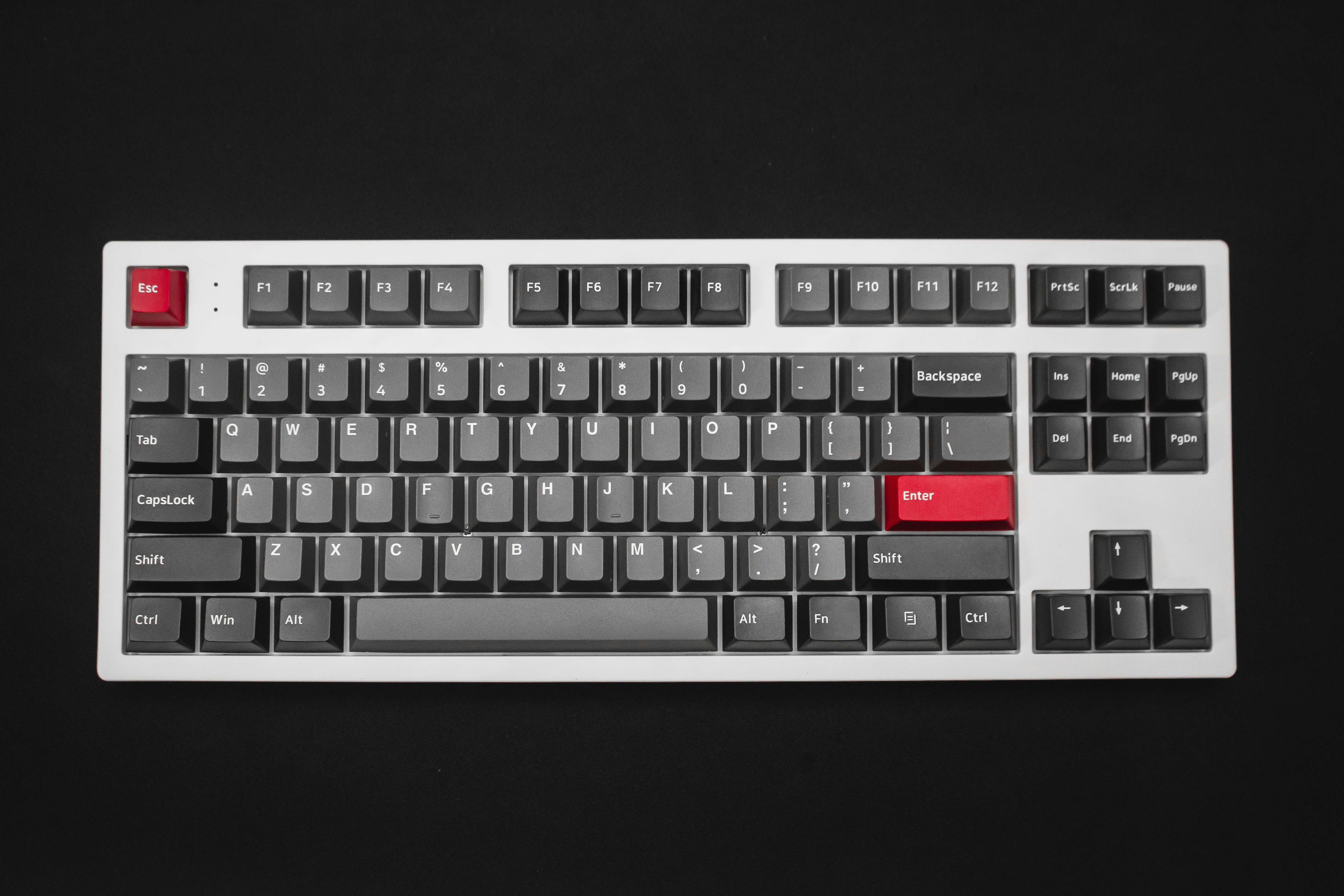
The Ducky One 3 SF is a 65% mechanical keyboard that embodies the no-nonsense approach Ducky is famous for. It comes with genuine Cherry MX switches, double-shot PBT keycaps, hotswap sockets, and acoustic foam pre-installed — all at a competitive price. The One 3 generation adds notable improvements including factory-lubed stabilizers, a detachable USB-C cable, and a redesigned case with improved acoustics.
Unlike many competitors that use clone switches, the One 3 SF uses authentic Cherry MX switches manufactured in Germany. The double-shot PBT keycaps are among the best stock keycaps in the industry, with crisp legends that will never fade. The 65% layout strikes an ideal balance between compactness and functionality with dedicated arrow keys.
💰 Price Comparison — Ducky One 3 Sf
Features
- Genuine Cherry MX switches
- Hotswap sockets
- Double-shot PBT keycaps
- Acoustic foam pre-installed
- Detachable USB-C
Tech Specs
| Size | 65% |
| Connection | USB-C Wired |
| Switches | Cherry MX (Red/Brown/Blue/Speed Silver) |
| Weight | 800g |
| Keycaps | PBT double-shot |
| Hotswap | Yes |
| Layout | ANSI |
| N-Key Rollover | Yes |
| Polling | 1000Hz |
Build Quality & Design
The Ducky One 3 SF represents Ducky's third-generation refinement of their classic 65% design, and the improvements are immediately apparent. The case is constructed from thick ABS plastic with a subtle texture that resists fingerprints and feels premium to the touch. While it lacks the cold, dense feel of aluminum, the plastic construction keeps the weight at a manageable 800g — heavy enough to stay put during typing but light enough to toss in a bag for LAN parties or office commutes. The build quality is excellent for a plastic keyboard: there are no creaks, no flex points, and no uneven panel gaps.
Ducky's Taiwanese manufacturing heritage is evident in the tight tolerances and consistent quality control. Compared to budget plastic keyboards like the Akko 5075S, the One 3 SF feels noticeably more solid and well-constructed, with a denser plastic and better overall fit and finish.
The double-shot PBT keycaps are among the best stock keycaps in the industry. The legends are crisp, consistently centered, and will never fade because the plastic is molded in two colors rather than printed. The texture is smooth with a subtle matte finish that provides good grip without being rough, and the keycaps have a satisfying thickness that contributes to the keyboard's excellent sound profile. The OEM profile is familiar and comfortable, and the keycaps have a quality that rivals aftermarket sets costing $40-60. This is a significant advantage over keyboards that ship with thin ABS keycaps, which develop shine and wear within months.
The included accent keycaps (often in yellow, blue, or red depending on the colorway) add a touch of personality without being garish.
The acoustic foam pre-installed in the case is a welcome addition that addresses one of the main complaints about previous Ducky generations. The foam absorbs case ping and hollowness, resulting in a cleaner, more refined sound profile. Combined with the factory-lubed stabilizers, the One 3 SF produces a sound that rivals keyboards costing significantly more. The detachable USB-C port is positioned on the left side of the keyboard, which may cause cable routing issues for some desk setups but is generally well-placed.
The three-way cable routing channels on the bottom of the case are a thoughtful touch that helps manage cable direction. The adjustable feet offer three angle options (flat, medium, high), allowing users to find their preferred typing angle.
After a year of daily use, our review unit has held up remarkably well. The PBT keycaps show absolutely no shine on the most-used keys, which is a testament to the quality of the double-shot molding process. The case has no scratches or wear marks, and the USB-C port remains tight and secure. The only minor wear point is the rubber feet, which have accumulated some desk debris but still provide excellent grip.
The Ducky One 3 SF is built to last, and the build quality reflects Ducky's decades of experience manufacturing keyboards. This is a keyboard that will still look and feel great after years of heavy use, which cannot be said for many keyboards in this price range.
Typing Experience
The genuine Cherry MX switches in the Ducky One 3 SF deliver the classic mechanical keyboard experience that made Cherry the industry standard. The MX Red (linear) switches are smooth and quiet, with a consistent 45g actuation force that is ideal for both typing and gaming. The MX Brown (tactile) switches provide a subtle bump at the actuation point, offering tactile feedback without the noise of clicky switches. The MX Blue (clicky) switches are the loudest and most tactile, with a satisfying click that some typists find addictive but is definitely not suitable for shared spaces.
The MX Speed Silver switches have a shorter 1.2mm actuation for faster response in games, though this can lead to more typos during typing. Ducky's factory lubrication on the switches is minimal but effective — the switches are smoother than previous Ducky generations, though enthusiasts may still want to add aftermarket lube for the ultimate experience.
The acoustic foam and factory-lubed stabilizers make a noticeable difference in the typing experience compared to the Ducky One 2 series. The spacebar produces a clean, deep sound without the rattle that plagued earlier models, and the backspace, enter, and shift keys exhibit the same improved performance. The stabilizers are not quite as refined as those on the Keychron Q1 Pro — there is a hint of ticking on the spacebar during fast typing — but they are significantly better than the average pre-built keyboard and consistently acceptable for the vast majority of users.
The plate-mounted design provides a firm, consistent typing surface with minimal flex, which some users prefer for its precision while others may find it less forgiving than gasket-mounted alternatives.
The 65% layout is one of the most practical compact layouts available. You get dedicated arrow keys, which are essential for text navigation, coding, and spreadsheets, along with Delete, Page Up, and Page Down keys. The function row is accessed through the Fn layer, which is a small adjustment but becomes second nature within a few days. The compact size frees up significant desk space while retaining all the keys needed for productive work.
For users coming from a full-size keyboard, the adjustment period is typically 3-5 days, and most find the compact layout more ergonomic because it keeps the mouse closer to the keyboard. The 65% layout is the sweet spot between the ultra-compact 60% (no arrow keys) and the larger 75% (includes function row), and Ducky's implementation is one of the best in the industry.
Long-term typing comfort is good but not exceptional. The plastic case and plate-mounted design mean there is very little flex or give when bottoming out, which can lead to finger fatigue during marathon typing sessions. This is the trade-off for the precise, direct feel that the One 3 SF provides — it is responsive and immediate, but less forgiving than gasket-mounted keyboards.
The adjustable feet allow users to find a comfortable typing angle, and the keyboard's height is moderate enough that a wrist rest is optional for most users. For programmers and writers who spend 8+ hours typing, the One 3 SF is a capable daily driver, though users who prioritize long-term comfort over precision may prefer a gasket-mounted keyboard like the MonsGeek M1W or Keychron Q1 Pro.
Gaming Performance
The Ducky One 3 SF is an excellent gaming keyboard, even though it doesn't market itself as one. The 1000Hz polling rate and wired USB-C connection provide standard gaming-grade responsiveness with approximately 1ms of latency. In testing across Valorant, CS2, and League of Legends, the keyboard felt snappy and precise, with no perceptible input lag.
The Cherry MX Speed Silver switches are the best option for competitive gaming, with their shorter 1.2mm actuation providing a slight edge in reaction time. The MX Red switches are a close second, offering a more forgiving typing experience with only marginally slower actuation.
The plate-mounted design provides a firm, direct bottom-out that competitive gamers often prefer — there is no mushy flex to slow down rapid key presses.
The compact 65% layout is a significant advantage for gaming, particularly for FPS players who use low mouse sensitivity and large mousepads. The extra desk space allows for wider mouse movements without the keyboard getting in the way. The N-key rollover ensures that every keypress is registered even during the most frantic gaming moments, and the anti-ghosting technology prevents phantom keypresses when multiple keys are held simultaneously. The PBT keycaps provide excellent grip during sweaty gaming sessions, and the textured surface prevents fingers from slipping off keys at critical moments.
The hotswap PCB means you can install speed switches for gaming and swap back to tactile switches for typing — a versatility that is rare in keyboards at this price point.
Compared to dedicated gaming keyboards like the Razer BlackWidow V4 Pro, the Ducky One 3 SF lacks gaming-specific features like 8000Hz polling, Rapid Trigger, or dedicated macro keys. However, it compensates with superior build quality, better keycaps, and a more refined typing experience. For casual and semi-competitive gamers, the One 3 SF provides more than enough performance, and the hotswap capability means you can customize the switches to your exact gaming preferences.
The only real gaming limitation is the lack of wireless connectivity — if you want a wireless gaming experience, you'll need to look at options like the MonsGeek M1W or NuPhy Air75 V2.
Software & Customization
The Ducky One 3 SF takes a refreshingly minimalist approach to software — it has none. All customization is handled through onboard controls using Fn key combinations. RGB lighting effects, brightness, and speed can all be adjusted without installing any software, and the keyboard stores settings in onboard memory. This is either a feature or a limitation depending on your perspective.
Users who want deep macro programming, per-key remapping, or application-specific profiles will find the lack of software frustrating. Users who value simplicity, reliability, and freedom from bloated software will appreciate Ducky's approach.
The onboard controls are comprehensive enough for most users — you can cycle through RGB effects, adjust brightness, control media playback, and switch between pre-configured profiles using key combinations printed on the keycaps.
The DIP switches on the bottom of the keyboard provide hardware-level customization options. You can swap the positions of Caps Lock and Left Control, swap Alt and Windows keys for Mac compatibility, lock the Windows key during gaming, and change the keyboard layout. These are hardware-level changes that persist regardless of which computer the keyboard is connected to, which is valuable for users who switch between different machines. The hotswap PCB is the most significant customization feature — you can swap switches without soldering, allowing you to experiment with different switch types and find your excellent feel.
The 5-pin hotswap sockets accept virtually any MX-compatible switch on the market, including boutique switches from brands like Zeal, Gateron, and Kailh.
The RGB customization, while software-free, is surprisingly capable. The keyboard includes multiple built-in lighting effects including reactive typing, wave, ripple, and static modes. Brightness and speed can be adjusted across multiple levels, and the per-key RGB can be configured with custom colors using onboard controls — though this process is admittedly tedious without software. The south-facing LEDs are bright and produce even illumination, and the double-shot PBT keycaps allow the light to shine cleanly through the legends.
For users who want complex RGB animations or application-specific lighting profiles, the lack of software will be a limitation. For users who set a static color and forget about it, Ducky's approach is an excellent quite adequate and eliminates the hassle of software updates and background processes.
Who Should Buy This
The Ducky One 3 SF is the ideal keyboard for users who want a reliable, no-nonsense mechanical keyboard with excellent build quality and no software dependency. It is particularly well-suited for users who value simplicity and reliability over feature count — the genuine Cherry MX switches, premium PBT keycaps, and solid construction provide a typing experience that just works, without the complexity of QMK configuration or the bloat of gaming software. The hotswap PCB makes it a great platform for beginners who want to experiment with different switches, and the compact 65% layout strikes the excellent balance between functionality and desk space.
At its price point, the One 3 SF competes with keyboards that offer more features — the MonsGeek M1W adds wireless connectivity and an aluminum case, while the Keychron Q1 Pro adds gasket mount and QMK/VIA support. However, the Ducky counters with genuine Cherry MX switches (which many users still prefer over Gateron clones), the best stock keycaps in its class, and a proven track record of reliability. It is not the best value option, nor is it the most feature-rich, but it is one of the most dependable and well-rounded keyboards available.
For the user who wants a great keyboard that will work consistently for years with zero fuss, the Ducky One 3 SF is a compelling choice that deserves its reputation as a modern classic.